November 2025
In order to visualize the course classification of lecturers and program area managers in DigComb 2.3 AT, we began developing icons in the fall of 2025 and finally found a current draft.
Initially, we based our designs on the existing project logo, but after receiving feedback from colleagues, we quickly realized that our frist draft was not without barrieres. Our initial idea was to gray out areas of competence that were not addressed by the course. However, this representation is almost impossible for people with visual impairments to see. In addition, we realized that the icon also had to be easily recognizable in the mobile view or in any other smaller representation.
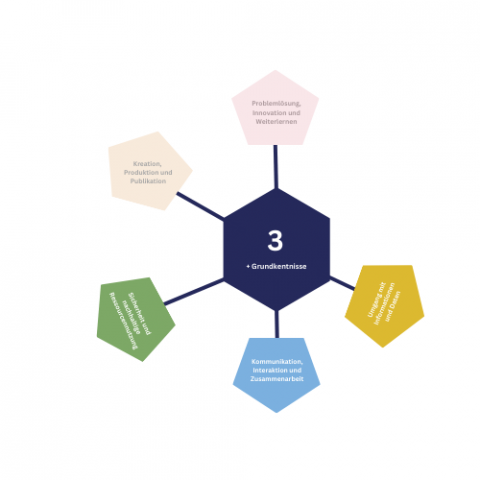
First draft with text fields and grayed out areas. In this example, the competence levels Safety, Communication and collaboration and Information and data literacy are addressed in the course. After successful participation, participants have attained competency level three.
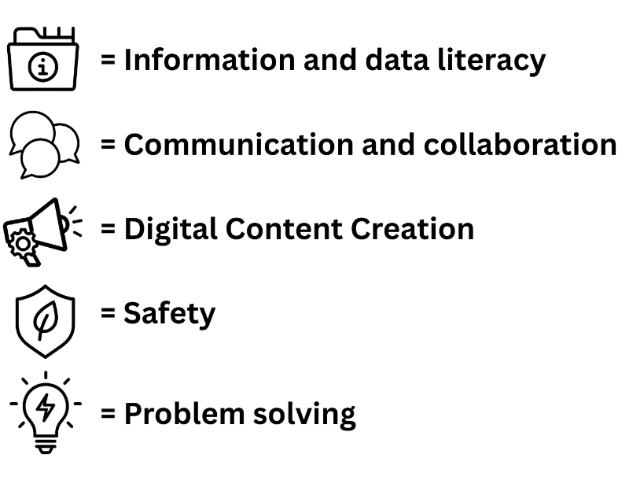
Our conclusion was that the second draft had to meet the following criteria: stronger contrasts, e.g., through borders, little to no text, and icons to visualize the areas of competence. First, we used Microsoft Copilot to create symbols for the areas of competence that roughly reflect them. Instead of the names of the areas of competence, we then only used symbols and placed them in the middle of the field. In this representation, only the areas that are actually addressed in the course should be highlighted by color and symbols.

Second draft with icons and with outlines to highlight wether a competence level will be addressed or not. Again in this example, the competence levels Safety, Communication and collaboration and Information and data literacy are addressed in the course. After successful participation, participants have achieved the basis level two.
With this design, however, we faced the challenge that it looked as if the number in the middle applied to all areas of competence. However, since this is only the basic competence, which is the foundation for all other areas, we decided to place it at the bottom as a real foundation. It had the nice side effect, that it looked like the areas of competence are like flowers growing out of the basic competence on the ground.
In our current version, only the areas of competence addressed by the respective course are now displayed, and the basic competence is named as such and assigned the corresponding number.
Example of our current draft. Three out of the five competence levels are addressed in this example
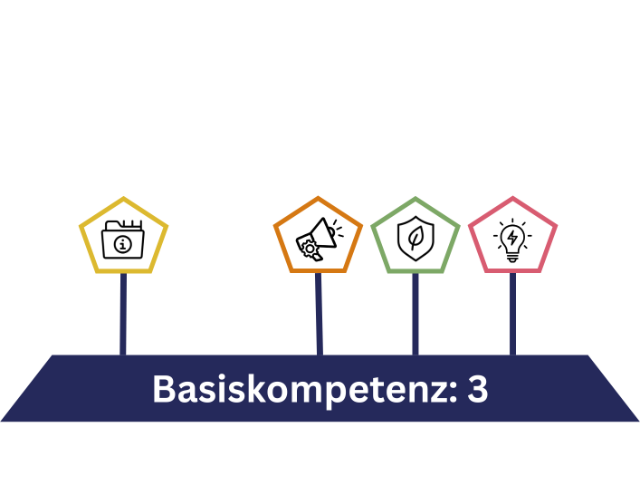
We also had the idea of letting the “flowers” of the areas of competence grow according to their classification from 1 to 6. Depending on what level they address they would differ in the height. However, since the icon must also be understandable at a glance and for people who have never dealt with DigComb before, we decided against it.